Marketing and SEO
To make an online store not only convenient but also profitable, it is important to attract customers through search engines and retain them with promotions and loyalty programs. SalesArt Drupal Commerce offers built-in marketing tools and easily integrates with SEO modules.
1. Discounts and promotions
Adding a discount:
- Go to Commerce → Promotions → + Add promotion. (admin/commerce/promotions)
- Set the conditions:
- discount on all products or selected categories;
- percentage (%), fixed or free shipping;
- promotion duration.
- Specify which customers can participate (for example, only registered users).
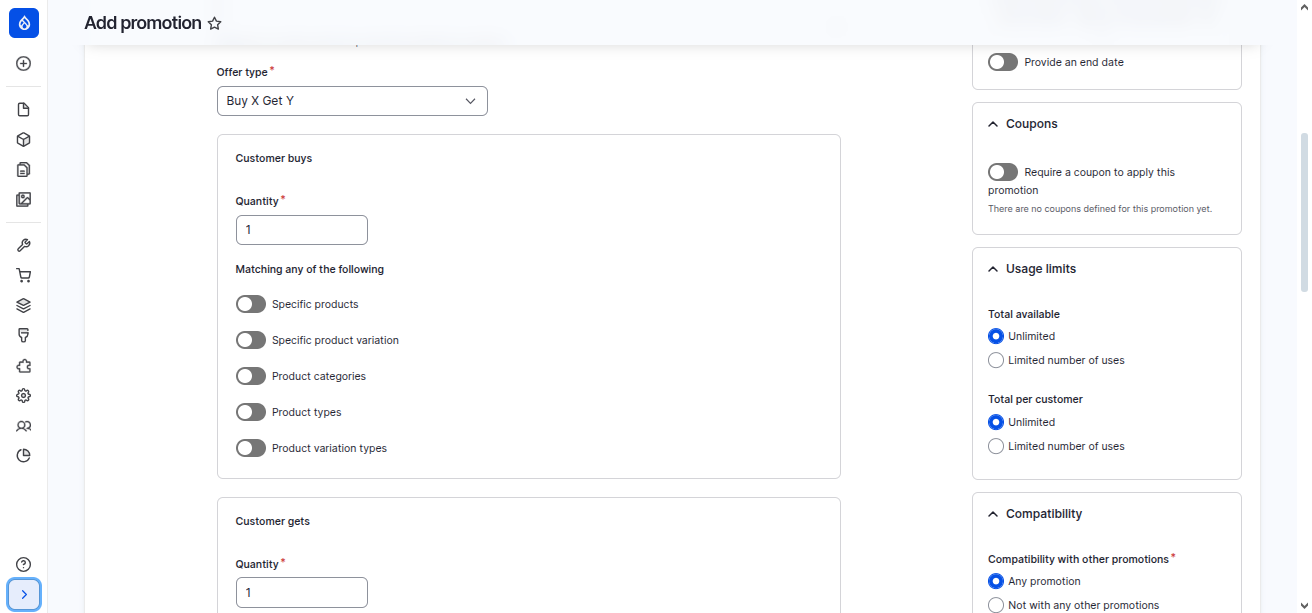
- "15% discount on all products until the end of the month";
- "Free shipping on orders over $50";
- "Buy 2 items — get the third one free."
2. Coupons
Coupons encourage repeat orders and increase customer loyalty. How to create a coupon in SalesArt Drupal Commerce?
- Create a new promotion:
Click "+ Add promotion" and fill in the basic details:
- Title: Title of the promotion (for example, "10% discount on your first order").
- Offer: Type of offer (e.g., "Percentage off the order subtotal" for a percentage discount).
- Conditions: Conditions of use (e.g., "Order total" or "Customer email").
- Coupons: Enable the "Require a coupon to apply this promotion" option to link a coupon.
- Set up the coupon:
- In the "Coupons" section, add the coupon code (for example, "SUMMER2025").
- Set usage limits (e.g., maximum number of uses or limit per user).
- Save the promotion.
⚙️ Coupon types
SalesArt Drupal Commerce supports various types of coupons:
- Fixed discount: For example, a discount of $500 per order. Use the "Fixed amount off the order subtotal" type.
- Percentage discount: For example, a 10% discount. Use the "Percentage off the order subtotal" type.
- Shipping discount: For example, free shipping. Use the "Fixed amount off the shipment amount" type.
🔧 Additional settings
- Time restrictions: Specify the start and end dates of the promotion.
- Terms of use: For example, the discount can only be applied to orders above a certain amount or to certain products.
- Automatic coupon generation: For mass promotions, you can generate multiple unique codes.
Promo code "WELCOME10" — 10% discount for new customers.
3. Email marketing and notifications
Drupal can be integrated with mailing services (Mailchimp, UniSender, SendPulse). Features:
- automatic sending of order status emails;
- welcome emails to new customers;
- promotional mailings with coupons and news.
Add the Mailchimp e-commerce module to automatically divide customers by order.
4. Website SEO settings
To optimize your online store for search engines, use a combination of modules:
- Pathauto — automatic generation of human-readable URLs. Already installed in SalesArt
/catalog/women's-boots instead of /node/123.
- Redirect — setting up 301 redirects to eliminate duplicates.
- Metatag — management of titles and meta descriptions. (already installed)
- XML Sitemap — generation of a sitemap for search engines.
- Schema.org Metatag — adding microdata (products, prices, reviews).
5. Content marketing
To increase organic traffic, use a blog or articles section.
- Write product reviews and compilations ("Best smartphones of 2025").
- Create instructions ("How to choose children's shoes").
- Publish news and press releases.
An article with the keyword "buy a reliable smartphone" attracts traffic and improves search rankings.
6. Integration with analytics
To evaluate the effectiveness of SEO and marketing, integrate your website with analytics services:
- Google Analytics 4 (via the google_analytics module);
- Yandex.Metrica;
- Google Tag Manager.
📌 What to track:
- traffic sources;
- order conversion;
- popular products and categories;
- promo code effectiveness.
7. Marketing and SEO recommendations
- Add unique product descriptions (do not copy from suppliers or other websites!).
- Use internal links (products → articles → promotions).
- Set up the URL structure: /catalog/category/product (already set up by default).
- Enable micro-markup to display prices and ratings in search results.
- Start regular promotions and special offers to retain customers.